Hypervision
Hypervision is a global real-time view of all your equipment. It allows you to monitor your entire equipment fleet from a single interface.
Overview
The Hypervision screen displays:
- Total number of equipment in your organization
- Number of connected equipment (online)
- Number of disconnected equipment (offline)
- Cards for each equipment with their real-time states
Accessing Hypervision
- Log in to your Kodeno account
- In the sidebar, click on "Hypervision"
Hypervision is only available for client users (ROLE_USER). Installers have access to a different view.
Equipment Cards
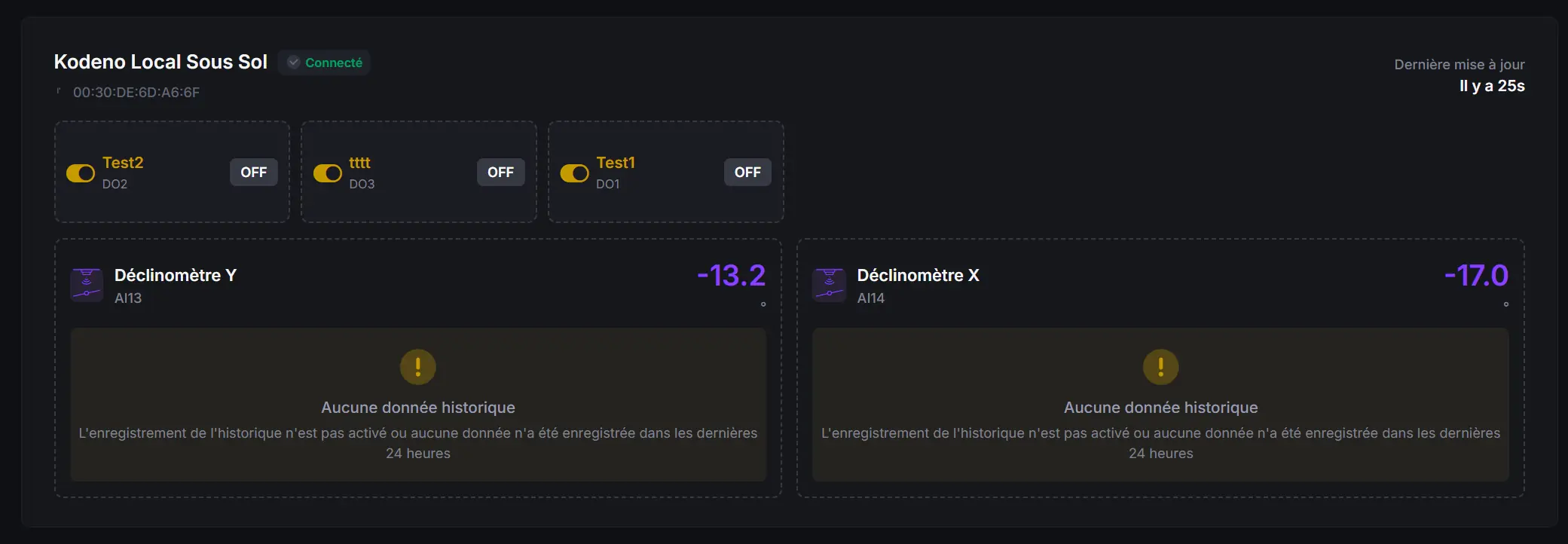
Each equipment is represented by a card displaying:
General Information
- Equipment name
- Connection status (online / offline)
- Last message received (timestamp)
Input/Output States
The card displays in real-time the values of all your configured sensors and actuators:
Digital Inputs
- ON/OFF state of each configured digital input
- Custom icon and name
Analog Inputs
- Measured value with unit
- Icon representing the sensor type
PT1000 Inputs (temperature)
- Temperature in °C
- Thermometer icon
Digital Outputs
- ON/OFF state of each output
- Quick action capability
Analog Outputs
- Current value with unit
Empty State
If you have no configured equipment, a message tells you how to add your first equipment.
Data Refresh
Data is automatically updated in real-time. You don't need to refresh the page to see the latest values.
The connection indicator lets you know instantly if your equipment is communicating properly. Equipment marked "offline" may indicate a network connection problem.
Navigate to Equipment
From Hypervision, you can quickly access the detailed page of equipment:
- Locate the desired equipment card
- Click on the card or the access button
- You are redirected to the equipment dashboard