Sites
Sites represent your different locations (buildings, factories, agencies...). They allow you to organize your equipment by geographical location.
What is a Site?
A site is an entity grouping:
- A name to identify it
- A description (optional)
- An address (required)
- One or more associated equipment
Accessing Your Sites
In the sidebar, click on "Sites" to see the dropdown list of all your sites. Each site is a direct link to its dashboard.
Creating a New Site
- Access your client space (via the user menu)
- Click on the "Sites" tab
- Click on the "New Site" button
- Fill in the information:
- Name (required): Site identifier
- Description: Additional information
- Address (required): Site location
- Validate the creation
Use explicit names for your sites (e.g., "North Factory", "Paris Headquarters", "Lyon Warehouse") to easily find them.
Site Dashboard
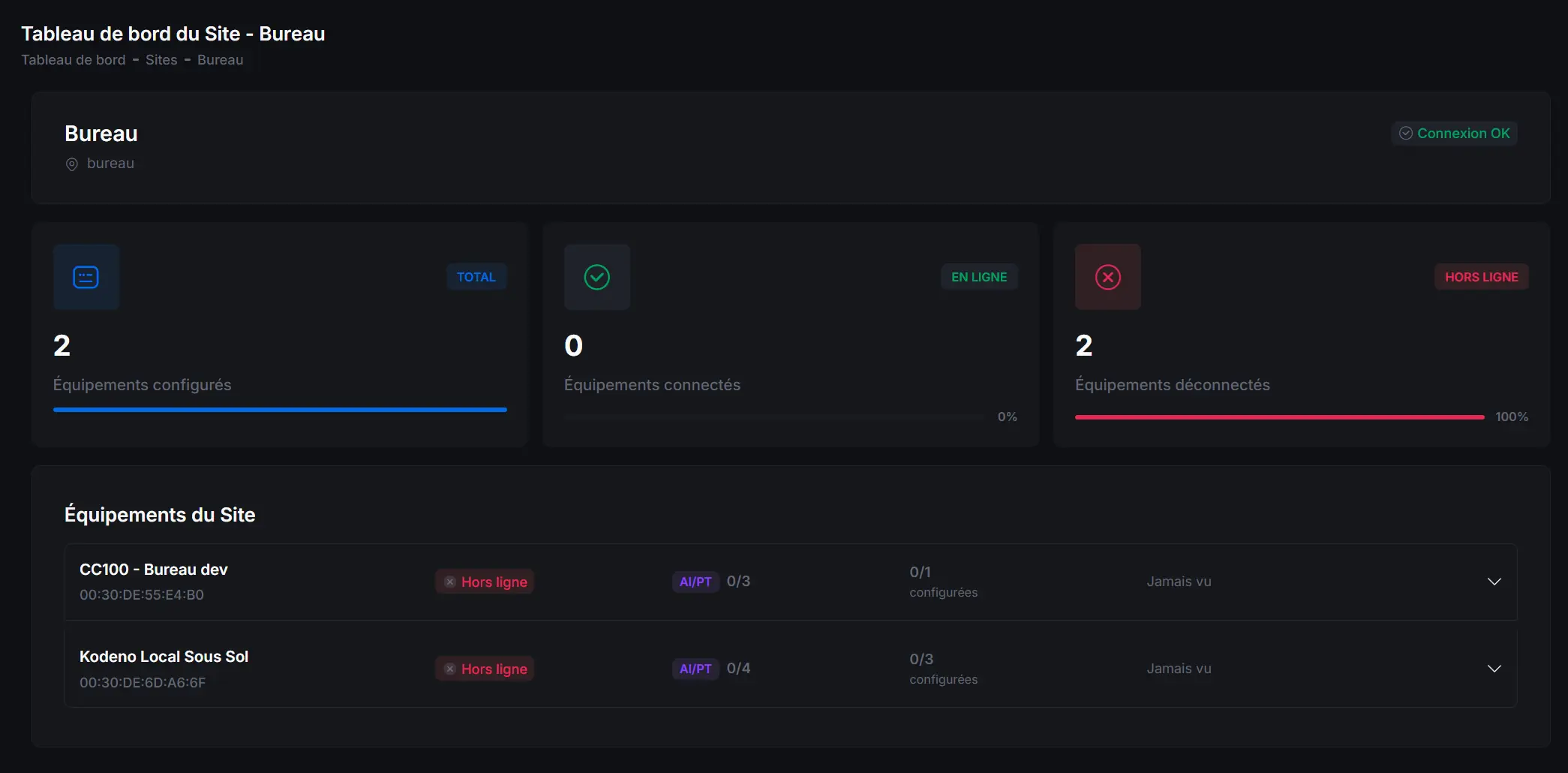
Each site has its own dashboard displaying:
Site Information
- Name and description
- Address
- Creation date
Associated Equipment
List of all equipment attached to this site with:
- Equipment name
- Connection status (online / offline)
- Last activity
- Real-time sensor values
Real-Time View
The site dashboard displays in real-time:
- Digital input states: ON/OFF
- Analog input values: Measurements with units
- PT1000 temperatures: In degrees Celsius
- Digital output states: ON/OFF
- Analog output values: Percentages or values
Modifying a Site
- Access the site dashboard
- Click on the "Edit" button (pencil icon)
- Modify the desired information
- Save the changes
Deleting a Site
Deleting a site is permanent. Associated equipment will be detached from the site but not deleted.
- Access site settings
- Click on "Delete site"
- Confirm deletion
Associating Equipment with a Site
During Equipment Creation
When creating equipment, you can select the assignment site.
For Existing Equipment
- Access equipment settings
- Select the site from the dropdown list
- Save changes
Detaching Equipment from a Site
- Access equipment settings
- Select "No site" or "None"
- Save
The equipment will no longer appear in the site dashboard.
Organizing Sites
For better organization:
- Group by geography: North, South, East, West
- Group by function: Offices, Warehouses, Production Sites
- Group by entity: Subsidiary, Department, Service
Clear organization of your sites facilitates navigation and monitoring of your infrastructure.
- Creation date
Associated Equipment
List of all equipment attached to this site with:
- Equipment name
- Connection status (online / offline)
- Last activity
- Real-time sensor values
Real-Time View
The site dashboard displays in real-time:
- Digital input states: ON/OFF
- Analog input values: Measurements with units
- PT1000 temperatures: In degrees Celsius
- Digital output states: ON/OFF
- Analog output values: Percentages or values
Editing a Site
- Access the site dashboard
- Click on the "Edit" button (pencil icon)
- Modify the desired information
- Save the changes
Deleting a Site
Deleting a site is permanent. Associated equipment will be detached from the site but not deleted.
- Access the site settings
- Click on "Delete Site"
- Confirm the deletion
Associating Equipment to a Site
From Equipment Creation
When creating equipment, you can select the assignment site.